Create Vendor
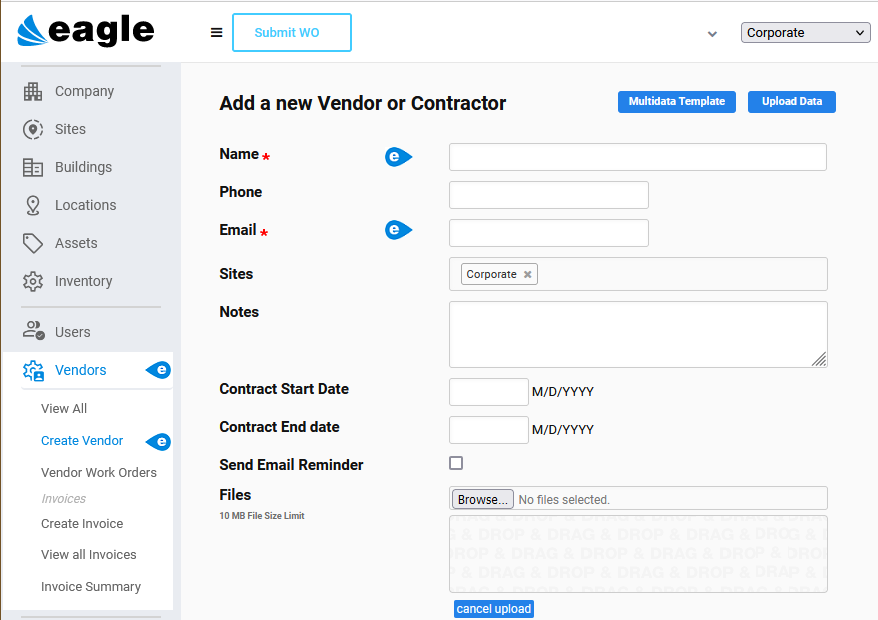
Path: Vendors > Create Vendor
Eagle CMMS Professional users can use the Vendors windows to account for external contractors as well as merchants. For example, if you contract all your maintenance staff duties, the contractors are considered Vendors. When you assign a Vendor role, you have the option to grant either Vendor Unlimited or Vendor Limited. Unlimited Vendors are allowed to submit work order requests.
Use the Create Vendor window to create a new Vendor record or to download a Multidata Template to add your own Vendor data. When the Template is completed, you can Upload your existing Vendor records to Eagle CMMS. See MultiData Templates for information.
The Create Vendor window opens when you select it from the menu or from when you click the Add button at the upper right of the Vendors View All window.
Once a new record is saved, the window refreshes and returns to the View All window. You can edit your new record to complete additional fields and sections at the bottom of the window.
If you contract some or all Staff services, you can use the Users > Invite User window to grant them access to Eagle CMMS and assign a Role of either Vendor Unlimited or Vendor Limited.
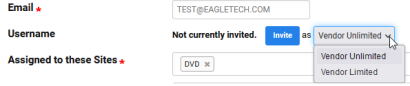
Unlimited Vendors are allowed to submit work order requests. See Invite User for more information.
 Create Vendor Records
To add new Vendor records, use the following instructions.
-
Open the Create Vendor window.
-
Enter the required Name and Email fields.
-
(Optional) Complete as many of the other fields as needed.
-
(Optional) Check Send Email Reminder to be reminded when the Contract ends.
-
Select Save.
The window refreshes and displays the Vendors View All window. Edit the new record to invite Staff and to accommodate payments to the Contractor or other Vendors in the Invoices section of the record